
Search for images or info
Free Drawing Programs
I am fortunate to find a lot of free drawing programs since I spend so much time on the internet. It really is an interesting place.
Today I want to share some free drawing software with you, so you can develop your computer abilities and have some artistic fun at the same time.
Free Drawing Program #1
PhotoFiltre
When you are learning to draw, it is fairly daunting when you come across the term "perspective" and what you need to know to portray it accurately.
There are a lot of books about perspective but I haven't found the right one for me yet.
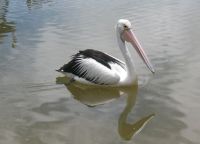
So, if all else fails, we can always use grids to assist us along the way!
I want to draw this pelican and I'd like to use a grid to help me. I really enjoy using them, it's quite good fun and the results can be outstanding.
If you have a photo or picture saved to your computer that you wish to draw, "PhotoFiltre" is a free program that will place a grid over a picture for you. Then it's your choice, you can draw straight from the computer screen, or you can print the gridded picture.
You can download PhotoFiltre here and then follow the directions on how to use it below.
Simple Photofiltre directions:
Once you install the program, double click on your Desktop PhotoFiltre icon.
The program will open up and you are presented with a blank canvas. To find a photo on your computer, Click on File (along the top), Click Open, and browse your files for the image you wish to experiment with.
Make sure you have the original photo saved before you do anything.
Once you select your photo, you can now see it displayed on the PhotoFiltre canvas.
Here's how to apply the grid to your photo:
- Click on Filter (along the top row, same as File/Edit etc).
- Go to the bottom of the displayed options, and select "Other".
- Further options become available, just select "Grid Generator".
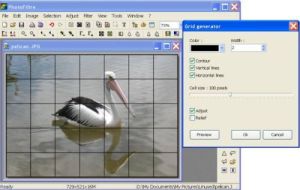
I selected a Width of "2", and I selected "100 pixels" to get the size of squares that I wanted. I left all of the default areas checked as they were. You can select any color grid that you like, black is default.
Try out whatever selections suit you, and click "Preview". If you don't like it, click CANCEL and try again. Once you are satisfied with your grid, simply Click OK. Then, under "File", select "Save As", to save this new image to your computer.
PhotoFiltre is an image editing software. If you play around with it, it can do a lot more than just adding a grid to your pictures.
Categories
Sketches
Instruction
Freebies
Other Areas
 Follow me



** Disclaimer: I receive a small commission if you buy via my links -- at no extra cost to you. **
The How To Sketch Guide
Here's a book that finally dispels the mystery of sketching!
... it only takes a little instruction
or guidance... Read more >>
Now In Paperback!
My first eBook
Simple Drawing Tips
4 kindle books combined
into one tidy book.
Free Drawing Program #2
Irfanview
I use an image program called Irfanview and I love it ... a lot!
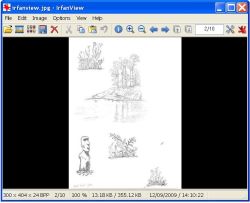
This was my very first image program and it is so easy to learn and use.
Use Irfanview to reduce the size of your drawings or photos or add text over your images, really, there's heaps of things that you can do.
It's a good program to start with because it shows you the basics of how most image programs operate, with no huge learning curve. You can move on to more sophisticated programs when you are ready.
There are numerous sites with Irfanview tutorials, and each one shows different features. If you don't find your answers on that linked page, you only need to do a search for "Irfanview Tutorials" with your favorite Search Engine.
Once you download Irfanview, play with it for a while to become familiar with it.
For further assistance, there is also a Frequently Asked Questions page on their site.
Free Drawing Program #3
Paint.net
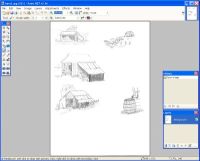
Click here to get Paint.net.
Look for the free download link (at time of writing it's on the top right) or you can choose to buy it as a way of making a donation. Be careful NOT to click on ads with the words "start download" or "get started" - these types of ads are a bit deceiving on a download page.
Again, this is an easy program to use once you get the hang of it and I use it frequently.
It's exciting to learn how to use all the features and it only takes a little bit of adventure on your part.
After you download it and you need some help, just scroll down on their home page to find links to tutorials and frequently asked questions. Youtube also has good videos to help you out with any problems you might experience.
Play with it and see what you can do!
Just because these are free drawing programs, it doesn't mean they aren't good quality. On the contrary, they pretty much do everything.
Free Drawing Program #4
Microsoft Paint
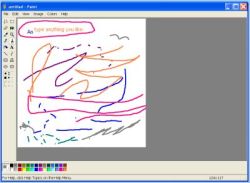
Paint (formerly Paintbrush for Windows) is a simple graphics painting program that has been included with all versions of Microsoft Windows.
It is often referred to as MS Paint or Microsoft Paint.
To access it on your computer, click on "Start", -"All Programs", -"Accessories" and you will see "Paint" listed there.
My granddaughter loves this program, at 4 years old it kept her occupied for ages. She selects a brush and a color and she has a lovely time creating designs on the canvas. If you are ever stuck for ideas on what to do when you babysit, remember this program!
All you do is click on the symbols on the left and then click as you move your cursor on the page. It'll show you what each icon (or symbol) does.
Practicing with this particular software is advantageous if ever you decide to buy a drawing tablet.
Some of the other free drawing programs also have the facility to sketch or draw lines on a canvas.
Free Drawing Program #5
Gimp
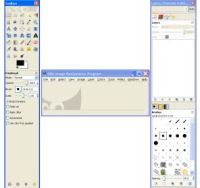
I haven't had much time to play with this program, but it is very good and also popular.
If you want to download Gimp, look for the "Download" button, at the top of their page.
Here is the link to Gimp tutorials for beginners, intermediate and experts.
These tutorials will show you everything this program is capable of doing.
It really is remarkable and so awesome that it is free.
Free Drawing Program #6
Artweaver
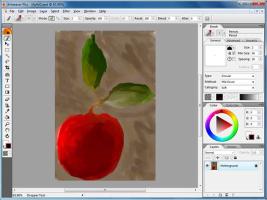
I have yet to use Artweaver but I've heard it's a good paint and photo program.
Just to name a couple of the features I've read about, the friendly interface guides you as you go along plus there's a wide selection of brush strokes to choose from, depending on the type of image you want to create.
There is a free version and a paid version so when you visit the Artweaver website, click on the button to download Artweaver Free.
The free version will do most things and it's a valuable teaching tool while having fun at the same time. You've got nothing to lose and everything to gain.
In Appreciation
Thank you very much to all of the generous people who make these fantastic free drawing programs available to us.
There's more for you to enjoy...
* Allaboutdrawings.com is a participant in the Amazon Services LLC Associates Program, an affiliate advertising program designed to provide a means for sites to earn advertising fees by advertising and linking to Amazon.com.
Copyright © 2005 - 2024 www.allaboutdrawings.com. All rights reserved.